Delivered online or on-site, these instructor-led live Microsoft Power Platform training courses focus on interactive, hands-on practice. This approach equips participants with the practical skills needed to adapt, implement, integrate, and manage Microsoft Power Platform components and features effectively within their organization.
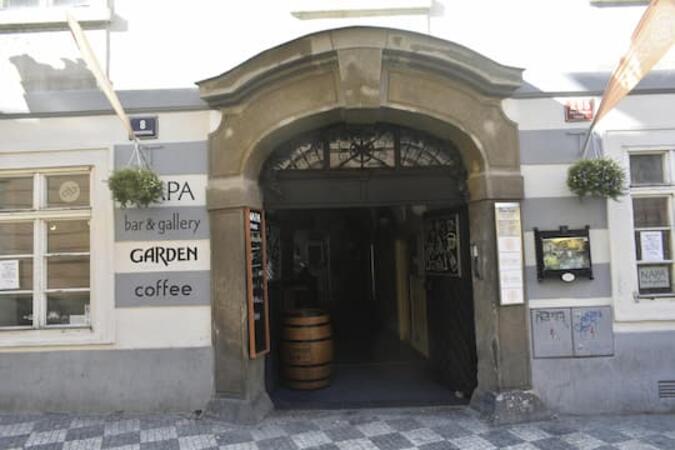
Microsoft Power Platform training is offered as either "online live training" or "onsite live training." Online live training (also referred to as "remote live training") is conducted through an interactive remote desktop. Onsite live training takes place directly at customer premises in Prague or within NobleProg corporate training centers in Prague.
From Prague Main Train Station (Praha hlavní nádraží)
Take tram 9 from Hlavní nádraží toward Sídliště Řepy.
Get off at Újezd.
Walk about 10 minutes toward Malostranské náměstí / Prokopská.
Continue along Prokopská to 296/8.
Alternative: Take the metro C from Hlavní nádraží → Muzeum, change to metro A → Malostranská, then walk across Malá Strana. This involves more walking.
From Prague Bus Station — Florenc
Take metro B from Florenc toward Zličín.
Get off at Můstek.
Change to metro A toward Nemocnice Motol.
Get off at Malostranská.
Walk approximately 10–15 minutes to Prokopská 296/8.
This live, instructor-led training in Prague delves into the core concepts and practical fundamentals of the Microsoft Power Platform, empowering participants to create low-code apps, automate workflows, and integrate with Dynamics 365. It is perfectly suited for beginners seeking practical, hands-on skills.
This live, instructor-led training on Prague provides practical experience with the Microsoft Power Platform. Learners will master the integration of Power Apps, Power Automate, and Power BI to construct connected, low-code business solutions that drive productivity and automate intricate workflows.
This practical course in Prague explores the use of Power BI and Power Apps for data visualization and workflow automation. Participants will learn to link data sources, construct interactive dashboards, and design low-code applications that boost operational efficiency without requiring advanced coding skills.
This advanced, instructor-led course on Prague delves into AI Builder for Microsoft Power Platform, highlighting low-code AI applications. Participants will learn to design and train models for OCR extraction from diverse document types, as well as build custom predictive models for both classification and regression tasks.
This hands-on training in Prague empowers intermediate professionals to construct end-to-end RPA solutions using Microsoft Power Automate. Participants will learn to build attended and unattended flows, integrate with cloud services, and utilize AI Builder for advanced automation and governance.
This instructor-led, live training in Prague explores the core concepts and practical fundamentals, enabling participants to develop actionable skills that directly address real-world work environments and contemporary business requirements for Microsoft Power Platform.
This instructor-led, live training in Prague helps users with beginner to intermediate skills master the Microsoft Power Platform. Attendees will learn to develop custom applications, automate workflows, and apply governance best practices using Power Apps and Power Automate within a hands-on lab environment.
This instructor-led, live training in Prague (online or onsite) is aimed at intermediate-level IT professionals who wish to use Power Platform to effectively automate processes and enhance data insights.
By the end of this training, participants will be able to:
Develop and customize applications using Power Apps.
Manage and analyze data with Dataverse and Power BI.
Automate complex processes with Power Automate.
Design and deploy intelligent chatbots using Power Virtual Agents.
Integrate and optimize workflows across the Power Platform suite.
This instructor-led, live training in Prague (online or on-site) is designed for business analysts who wish to automate workflows and tasks using Microsoft Flow/Power Automate.
By the end of this training, participants will be able to:
Develop business applications without requiring any prior developer experience.
Manage and analyze flows to support business solutions.
Create flows, define triggers, add actions, and establish conditions.
This instructor-led, live training in Prague (online or onsite) is designed for business staff, managers, developers, and data analysts who wish to adapt, implement, integrate, and manage Microsoft Power Platform components and features within their organizations.
Upon completion of this training, participants will be able to:
Develop simple applications using Power Apps to craft custom solutions tailored to daily business requirements.
Automate workflow processes with Power Automate (previously known as Microsoft Flow) to reduce manual and repetitive tasks.
Generate data reports and dashboards via Power BI to derive insightful analytics for the business.
Construct chatbots using Power Virtual Agents to automate and address common customer inquiries and issues.
This course provides a foundational understanding of Power Virtual Agents, Power Automate, and Power Apps, while also introducing Power BI at a high level. The curriculum is centered around a workflow originally performed manually for a previous employer. Participants will build a Power App using Microsoft Power Apps to monitor tasks for houses under construction, with data stored in SharePoint for simplicity. We will then leverage Power Virtual Agents to demonstrate how users can enable bots within Microsoft Teams to guide them to documents scattered across various SharePoint sites, such as loan agreements, budgets, and sales contracts (used as the course example). I believe these bots have significant potential for HR and IT teams to address repetitive inquiries efficiently. Additionally, you will learn to configure simple flows in Power Automate to save attachments from specific senders (in our example, attachments related to bank inspections of the units). We will also cover other basic flows that save data from Microsoft Forms back to SharePoint and develop fully automated processes using the Approvals app in Microsoft Teams. After completing the app, bot, and flow, the final step involves creating a straightforward Power BI report. We will use Power Automate to send a snapshot of the table containing the most recent completed tasks every two weeks to a designated recipient (the bank in this scenario). This report will request a draw, including the date the tasks were completed and their associated budget amounts (all data collected via the app). Please note that this course is designed at a high level. I recommend learners use ChatGPT to assist with more technical aspects, such as coding and formulas in Power Apps. However, we will cover this during the course, demonstrating how to effectively utilize ChatGPT to help craft formulas for Power Apps.
Read more...
Last Updated:
Testimonials (3)
Practical and hands on labs on report developmemt using Power BI
The labs were excellent and the trainer offered very good hands on sessions
Sinzala Sichaanji - Bank of Zambia
Course - Mastering Power Platform: Power Apps, Power Automate, DataVerse, Power BI, and Power Virtual Agents
We did quite complex examples, so we could get a feeling of how the real work with Power Automate Desktop can look like in the real world scenario.
Online Microsoft Power Platform training in Prague, Microsoft Power Platform training courses in Prague, Weekend Microsoft Power Platform courses in Prague, Evening Microsoft Power Platform training in Prague, Microsoft Power Platform instructor-led in Prague, Online Microsoft Power Platform training in Prague, Evening Microsoft Power Platform courses in Prague, Microsoft Power Platform trainer in Prague, Weekend Microsoft Power Platform training in Prague, Microsoft Power Platform on-site in Prague, Microsoft Power Platform instructor in Prague, Microsoft Power Platform coaching in Prague, Microsoft Power Platform one on one training in Prague, Microsoft Power Platform instructor-led in Prague, Microsoft Power Platform classes in Prague, Microsoft Power Platform boot camp in Prague, Microsoft Power Platform private courses in Prague